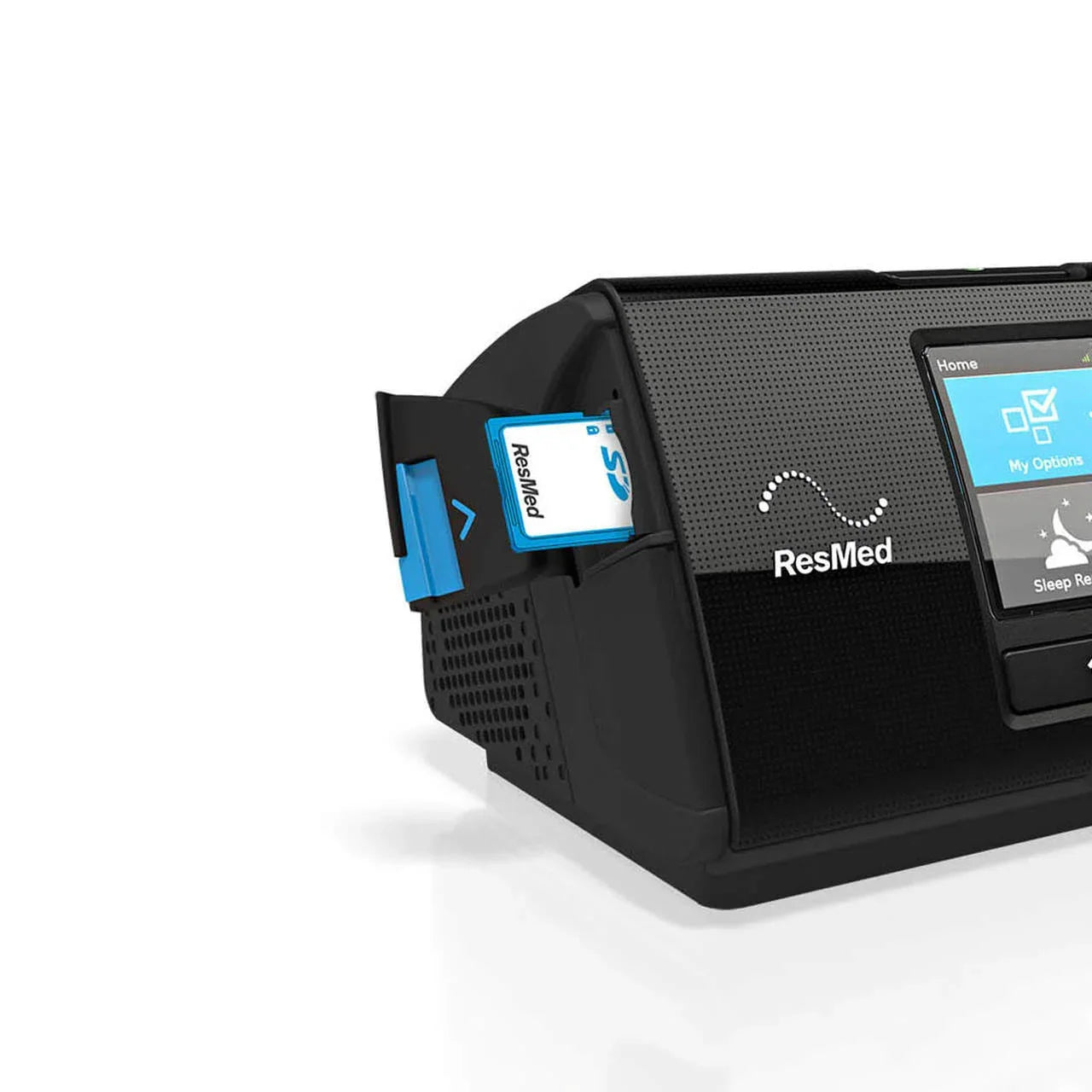
ResMed AirSense 10/11 SD Data Card — Overview
The ResMed AirSense 10/11 SD Data Card is the official 4GB SD card for all AirSense 10, AirCurve 10, AirSense 11, and AirCurve 11 CPAP and BiPAP machines. It provides the primary method of recording, storing, and transferring your detailed sleep therapy data — including compliance records, session-level therapy details, and high-resolution flow data — to your sleep physician, sleep clinic, or personal data management software such as OSCAR or SleepHQ.
The card records three distinct tiers of data simultaneously. Compliance and summary data — the session-by-session record of usage hours, AHI, and key therapy metrics — is stored for up to 365 sessions, giving a full year of therapy history. Detailed therapy data, which includes pressure delivery, leak rates, and event classifications for each session, is stored for the 30 most recent sessions. High-resolution flow data — the complete breath-by-breath waveform used by clinicians and advanced analysis software — is also stored for 30 sessions. A blue LED indicator on the machine illuminates when the card is actively writing data, signalling that it should not be removed until the LED turns off.
The card comes with a protective folder that keeps it safe from dust, scratches, and accidental damage during storage and transport. Plug-and-play installation — insert the card into the SD slot with the label facing up, close the cover, and the machine automatically begins recording. No formatting required.
Key Features
💾
365 Days Compliance Data
Stores a full year of compliance and summary data — AHI, usage hours, and key metrics for every session — for sharing with your sleep physician or compliance reporting.
📊
30 Sessions Detailed + High-Res Data
Stores 30 sessions each of detailed therapy data and high-resolution flow data — the full breath-by-breath waveform used by OSCAR, SleepHQ, and clinicians for in-depth analysis.
🔵
Blue LED Write Indicator
Blue LED on the machine illuminates when the card is actively writing — wait for it to turn off before removing the card to avoid data corruption.
🛡️
Protective Folder Included
Card ships with a protective storage folder — keeps the SD card safe from dust, scratches, moisture, and damage during storage and transport.
Specifications
| Part Number | 39228 |
| Storage Capacity | 4GB |
| Card Type | Standard SD (not SDHC, not microSD, not SDXC) |
| Compliance Data Storage | 365 sessions — usage hours, AHI, therapy summary |
| Detailed Data Storage | 30 most recent sessions — pressure, leaks, event classifications |
| High-Resolution Flow Data | 30 most recent sessions — full breath-by-breath waveform |
| LED Indicator | Blue LED on machine — illuminates while writing. Remove only when off |
| Compatible Machines | AirSense 10 (all variants), AirCurve 10 (all variants), AirSense 11, AirCurve 11, Lumis |
| Formatting | Not required — machine formats automatically on first use |
| Data Access Software | ResMed myAir (where available), OSCAR, SleepHQ, ResScan, AirView |
| Includes | SD card + protective folder |
How to Install and Use
- Locate the SD card slot on your AirSense 10/11 — on the side of the device behind a small cover
- Insert the SD card with the label facing up and the notched corner correctly aligned — push gently until it clicks into place
- Close the SD card cover — the machine automatically begins recording data from the next session
- The blue LED illuminates when the machine is reading or writing data — do not remove the card while the LED is on
- To access data, wait for the LED to turn off, then remove the card and insert it into your computer's SD card slot (or via a USB SD card reader if your computer has no SD slot)
- Open OSCAR, SleepHQ, or your clinic's software to view, analyse, and generate reports from the stored data
🇦🇪 Essential for UAE users: The ResMed myAir app's cellular data connectivity does not function in the UAE — the app is available but real-time wireless data sync from your AirSense 10 or AirSense 11 is not operational. The SD card is therefore the primary method for UAE patients to access detailed therapy data and share it with their sleep physician or clinic. This card is strongly recommended for all AirSense 10 and AirSense 11 users in the UAE.
💻 Free data analysis software: OSCAR (open-source) and SleepHQ (web-based, free tier available) can read your SD card data and produce detailed visual reports of your therapy — pressure waveforms, AHI events, leak graphs, and compliance history. These are the most widely used tools by CPAP patients for reviewing their own therapy data without requiring clinical software. Contact our team via WhatsApp on +971 56 593 5931 for guidance on setting up OSCAR or SleepHQ with your data.
⚠️ Card type matters: Only standard SD cards are compatible with AirSense 10 machines. SDHC, microSD, microSDHC, and SDXC cards are not compatible with the AirSense 10. The AirSense 11 supports larger capacity cards, but the official 4GB ResMed SD card provides ample storage for all data types and is guaranteed compatible. Always use the official ResMed SD card to ensure compliance with IEC 60601-1 medical equipment safety requirements.
Frequently Asked Questions
My machine didn't come with an SD card — do I need one?
Many AirSense 11 machines sold in the UAE are configured as Card-to-Cloud (no built-in modem) — these require an SD card to record and access detailed therapy data. Without an SD card, the machine stores only basic usage information internally. For UAE patients where myAir cellular sync is not functional, the SD card is essential for accessing your full therapy record.
Can I use any SD card, or does it have to be the ResMed brand?
ResMed recommends using the official ResMed SD card as it has been validated to meet IEC 60601-1 medical device safety standards. Third-party standard SD cards formatted as FAT32 will generally work, but ResMed cannot guarantee compatibility or safety compliance. For medical compliance reporting and clinical data sharing, the official card is recommended.
How do I view the data stored on the SD card?
Remove the card after the blue LED turns off and insert it into your computer's SD card slot or a USB SD card reader. You can then open the data in OSCAR (free, Windows/Mac/Linux), SleepHQ (free tier, web-based), or your sleep clinic's software. Our team can guide you through setting up OSCAR or SleepHQ — contact us via WhatsApp on +971 56 593 5931.
How long does the card store data before overwriting?
The card stores 365 sessions of compliance/summary data, and the 30 most recent sessions of detailed and high-resolution data. Once the 365-session compliance limit is reached, older sessions are overwritten. For most patients using CPAP nightly, this equates to approximately one year of compliance data. Regularly backing up data to a computer is recommended for long-term records.
Related Products